
Annotate Patent Figures
with Purpose-Built Tools.
Patent figure annotation software for adding reference numbers, managing labels, and exporting annotated patent drawings as PDFs.
7-day free trial · No credit card required
Annotra features
Reference Lists
Place a callout in two clicks. Import your reference list from CSV or Excel and number an entire figure set in one pass.
Accurate
Straight, curved, or S-curved leader lines with precision controls. Adjust callout placement and review the result before export.
Multi-Page Support
Keep reference numbers consistent across every sheet. Duplicate, reorder, and manage full figure sets in one project.
Custom Endpoints
Arrow, dot, or none. Mix and match leader line endings throughout your drawings.
Export Ready
Export an annotated PDF, then review the drawing and applicable filing requirements before submission.
Encrypted connections
Private file storage and encrypted connections.
Learn how Annotra protects your projects
Annotra at a glance.
Annotra is browser-based patent figure annotation software for patent illustrators, attorneys and agents. Add reference numbers, leader lines and figure labels to PDF drawings, manage a multi-page figure set, and export annotated PDFs for review.
Follow a two-figure numbering example- Import your reference list from CSV or Excel instead of retyping each number and description.
- Reuse a callout across figures while keeping its reference number. Adjust its placement for each view.
- Export annotated drawings as flattened or editable PDFs, then review the complete figure set before filing.
How It Works
Powerful Tools. Simple Process.
Annotra turns a patent drawing into an annotated PDF in three steps. First, import a PDF drawing and, optionally, a reference list from CSV or Excel. Second, annotate by placing numbered callouts with leader lines. Third, export a flattened or editable PDF to review before filing. All three steps happen in one browser workflow.
- 01
Import
Upload your patent drawings in PDF format, import your .csv or .xls file of reference numbers or add them on the spot.
- 02
Annotate
Place numbered callouts in two clicks. Leader lines draw themselves, then dial in curves, endpoint styles, and text to match your standards.
- 03
Export
Download publication-ready, annotated PDFs — flattened and ready for review, or editable so you can come back to them.
Watch this brief video introduction
See how reference numbers and leader lines are added to a PDF drawing in Annotra.
Quick Highlights
See It Done in Seconds
Annotra's quick-highlight videos are six screen recordings, each under 20 seconds, that show the core patent figure annotation workflow: starting a project and uploading PDF drawings, importing reference numbers from CSV, annotating multiple pages, adding figure numbers, resizing the drawing, and checking every reference number before exporting the final PDF.
Built for Patent Professionals
Built by Patent Professionals
Designed by a senior patent illustrator for real-world patent workflows.
Fast and Intuitive
Place reference numbers and leader lines with purpose-built controls.
Private file storage
Stored files use access controls and encrypted connections. See our security guide for details.
PDF export
Export annotated drawings for review before filing.
Why Annotra
Choose the right tool for the work.
Annotra is a patent figure annotation tool, not an illustration service or a general drawing program. Annotra adds reference numbers, leader lines and labels to drawings you already have. Adobe Illustrator and AutoCAD are general-purpose design tools, and outsourced drafting services create the drawings themselves. The table compares how each option handles the annotation step.
| Annotra | Adobe Illustrator | AutoCAD | Outsourced drafting | |
|---|---|---|---|---|
| Built for patent annotation | Purpose-built | General illustration | General CAD | Varies by vendor |
| Annotation workflow | Built in | Manual setup | Manual setup | Usually included |
| Workflow timing | Work in your browser | Work in your editor | Work in your CAD tool | Agree with provider |
| Team Collaboration | Optional Add-on | Depends on workflow | Depends on workflow | Through the vendor |
| Drawing flowcharts | Built-in diagram editor | General drawing tools | CAD drawing tools | Confirm scope with provider |
| Primary purpose | Figure annotation | Vector illustration | CAD drafting | Professional drawing services |
| Cost | $19.99/month or $199.99/year | Check current Adobe plans | Check current Autodesk plans | Project-specific quote |
Annotra supports annotation; professional illustration services create the underlying drawings. Choose based on the work you need.
Provider pricing, collaboration options, and included revisions vary. Compare current plans and written project quotes.
Pricing
Simple, transparent pricing.
Annotra Pro costs $19.99 per month, or $199.99 billed annually, which is approximately $16.67 per month. Every account starts with a 7-day free trial that includes all Pro features and needs no credit card; PDFs exported during the trial carry a watermark. An optional collaboration add-on for up to three collaborators costs $5 per month.
Free Trial
Freefor 7 days
Full access. No credit card. Exported PDFs carry a watermark.
- Every Pro feature unlocked
- Unlimited projects and figures
- Unlimited reference callouts
- Exports carry a watermark until you subscribe
Pro Monthly
$19.99per month
Cancel anytime.
- No watermark on exported PDFs
- Unlimited projects and figures
- CSV and Excel reference import
- Custom endpoints and leader lines
- Editable and flattened PDF export
- Built-in diagram editor for flowcharts
- Add up to 3 collaborators, $5/mo add-on
- Email support
Pro Yearly
$16.67per month, billed yearly
$199.99 billed annually (approximately $16.67/month).
- Everything in Pro Monthly
- Save approximately 17% versus monthly
- Priority support
- Early access to new features
Try everything free for 7 days. No credit card. Cancel anytime.
Private file storage and encrypted connections.
Annotra stores project PDFs in private Supabase storage and uses HTTPS for connections. Annotra is not end-to-end encrypted: it checks that a requester owns a project or is an accepted collaborator before issuing a temporary download link, and authorized administrators can access stored files. Send account and data-deletion requests to support@annotra.com.
Learn how Annotra protects your projectsHTTPS connections
Connections to the application and its hosted storage use HTTPS.
Checked PDF access
The PDF download endpoint checks ownership or accepted collaboration before issuing a temporary link. Treat that link as confidential while it is valid.
Deletion requests
Contact support@annotra.com for account and data-deletion requests. Backup retention and active-file deletion are separate processes.
Browser-based workflow
Use an up-to-date desktop browser. No desktop application installation is required.
Tools for your patent figure workflow
Annotra does the repetitive work.
Annotra removes the repetitive parts of patent figure annotation. Annotra imports an existing reference list instead of retyping it, draws each leader line from two clicks, keeps a duplicated callout's number on every page, warns about small annotation text, moves artwork without moving callouts, and lets invited collaborators work on the same figures.
Your reference list, not retyped
Import the numerals and descriptions you already have from CSV or Excel, then drag each one onto the drawing. Placed numbers are marked off as you go.
No leader lines drawn by hand
Click where the number goes, click what it points at, and the line is drawn. No pen tool, no aligning a text box afterwards.
One numeral, every figure
Duplicate a callout to another page, or to all of them at once, and it keeps its number. 100 stays 100 across the whole set.
Text-size warnings
Flags small annotation text and relative figure/page-number sizes. Review actual character height and filing requirements in the exported PDF.
Move the drawing, not the callouts
Shift-drag to reposition imported artwork and Ctrl-drag to scale it. Your callouts and figure numbers stay exactly where you put them.
Bring in whoever you need
Invite an illustrator, an attorney or a colleague onto a project. They work on the same figures without a subscription of their own.
Diagram Editor
Flowcharts and schematics, drawn in place.
Annotra's diagram editor draws flowcharts and schematics directly on a patent figure page. The editor opens over the current page with shapes, arrows, connectors, text and freehand tools. Apply to Page writes the finished diagram into the figure so it exports with everything else, and an applied diagram can be reopened and edited later.
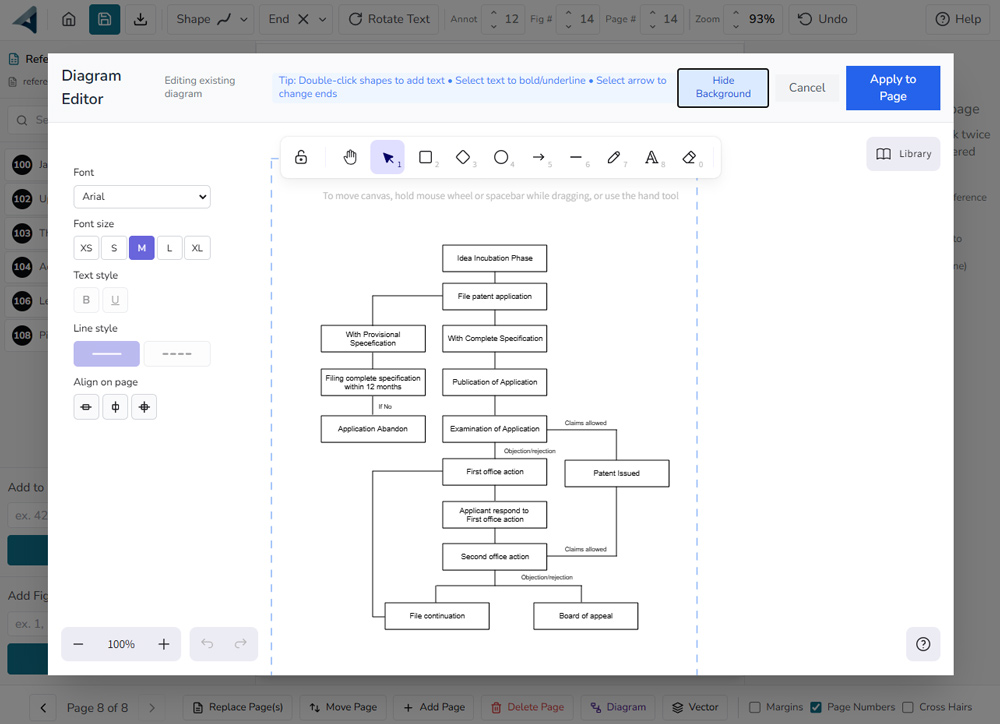
Shapes, arrows and freehand
Rectangles, diamonds, ellipses, connectors, lines and a pencil, plus text with its own font, size, weight and solid or dashed styling.
Aligned to the page
Margin guides stay visible while you draw, and the align controls place the finished diagram on the sheet instead of leaving you to eyeball it.
Applied into the figure
Apply to Page writes the diagram into the page itself, so it exports with everything else rather than arriving as a separate attachment.
Still editable later
Reopen a diagram you have already applied and carry on. It does not flatten on the first save.
FAQ
Questions, answered.
Annotra's frequently asked questions cover what Annotra is and who it is for, which file types it imports and exports, how reference numbers stay consistent across figures, how collaboration works, and what the free trial and Pro plans cost. Each answer below is written to stand on its own, without needing the rest of the page.
What is Annotra?
Annotra is browser-based software for adding reference numbers, leader lines, figure labels and other annotations to patent drawings, managing multi-page figure projects, and exporting the finished figures as PDF.
Who is Annotra for?
Annotra is built for patent professionals, including patent illustrators, patent attorneys and agents, IP teams, and inventors who prepare or review patent figures.
Do I need to install anything?
No. Annotra runs in a web browser. There is no desktop application or plugin to install.
Can I import a reference numeral list from CSV or Excel?
Yes. Annotra imports two-column reference lists from CSV, XLSX, or XLS files. You can then place the imported numbers on a drawing and see where each reference has been used.
Can one reference number stay consistent across multiple patent figures?
Yes. A callout can be duplicated to another page or to every other page, and each copy keeps the same reference number.
What drawing and reference-list file types does Annotra support?
Annotra accepts PDF drawings. Reference lists can be imported from CSV, XLSX, or XLS files.
What can Annotra export?
Annotra exports completed figure sets as PDF. A flattened export bakes annotations into the PDF; an editable export keeps annotations as separate layers for later work in compatible PDF software.
Can I draw a flowchart or schematic in Annotra?
Yes. Annotra includes a diagram editor with shapes, arrows, connectors, text, and freehand drawing. A diagram is applied to the figure page and can be reopened for editing later.
Can I work on an Annotra project with an illustrator or attorney?
Yes. The $5 per month collaboration add-on supports up to three collaborators across an account's projects. Collaborators are invited by email and do not need their own paid Annotra subscription.
How long is the Annotra free trial?
The free trial lasts seven days, includes all Pro features, and does not require a credit card. PDFs exported during the trial carry a watermark until the account subscribes.
How much does Annotra cost?
Annotra Pro costs $19.99 per month, or $199.99 billed annually (approximately $16.67 per month). A collaboration add-on for up to three collaborators costs $5 per month.
The founder story
Built around the work of a patent illustrator.
Annotra was built by Michael Williams, a patent illustrator and the founder of American Patent Drawings (APD), his patent illustration company. Michael designed Annotra from hands-on patent drawing work to bring reference numbers, leader lines, figure labels and PDF export into one focused workflow, built by someone who understands the work firsthand.
Michael Williams
Founder of Annotra and American Patent Drawings
Annotra is an early-stage product and brand of Design Serious LLC, based in Scottsdale, Arizona.
Ready to Annotate Your Patent Figures?
Annotra is free to try for seven days on your own patent drawings, with every Pro feature included. Import a PDF drawing, place reference numbers and leader lines, and export an annotated PDF to check the result before you decide whether to subscribe.
7-day free trial · No credit card required